
Inboxes are saturated. Templated emails get spotted in two seconds. The teams winning in 2026 use sequences to schedule the calls, comments, and personal touches that actually break through. Here’s how to build one.
Machine-gunning emails at people doesn’t work.
It barely worked a decade ago. Today, with every CRM, every AI tool, and every “growth hacker” on LinkedIn flooding the same inboxes with the same templated nonsense, it actively hurts you. Your prospect’s brain has spent years training itself to flick automated email into the trash before the second sentence registers. The harder you push that channel, the worse it performs.
That’s the paradox at the center of modern sales: the more automated outreach has become, the less effective it is. The only way through it isn’t more automation. It’s doing the human work that everyone else skips because the human work is hard, slow, and impossible to fake at scale.
The more digital we get, the more human we have to be.
That’s the thesis behind Sequence Activities — what we shipped today. Email Sequences in Nimble can now schedule tasks, calls, calendar events, and custom activities alongside automated emails. Not as a productivity feature. As a system that forces the human touches that actually break through.
What the human touch actually looks like
The human touch is more than building an email sequence and hitting send. It’s the homework, the LinkedIn comment, the personal text, and the call with real context — the work that lives outside the inbox. The people who consistently get responses do roughly the same things, and almost none of those things are email:
- They do their homework — read recent posts, scan the company’s last earnings call, listen to the podcast the prospect was on.
- They show up in the prospect’s digital footprint — substantive LinkedIn comments (not “Great insight!”), shares that prove they actually read the thing.
- They call — with context. Not a cold dial. A call that references the comment they left two days ago.
- They text on the right channel — a personal note that mentions an article, a podcast, a piece of news that matches what they know about the person.
None of that scales the way templated email does. That’s the point. The reason it works is that almost nobody does it.
What changed today
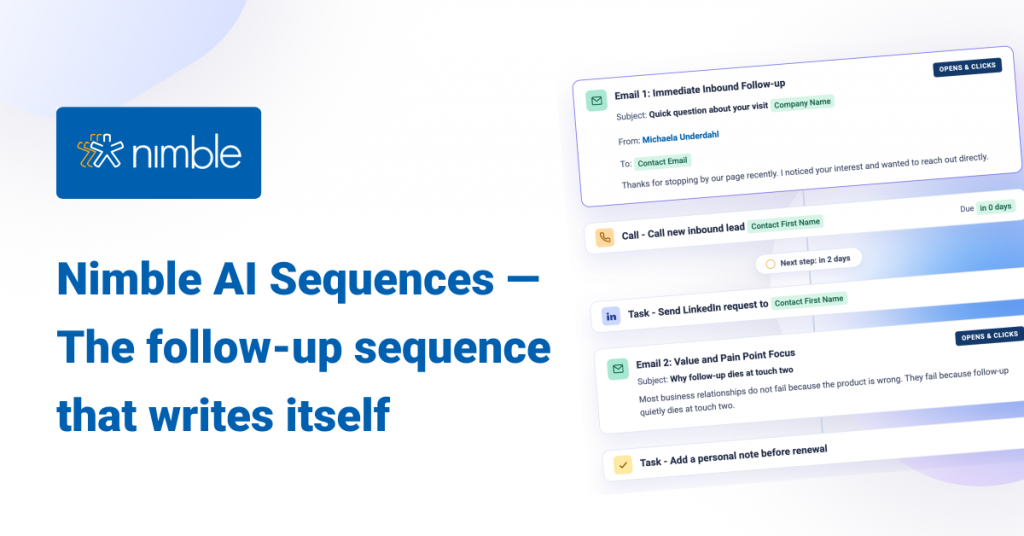
Nimble sequences are no longer email sequences. They’re plays — every action you’d take if you had unlimited time and perfect memory. The email, yes, but also the LinkedIn comment, the prep task, the call, the text, the meeting. Each step is scheduled. Each step is assigned to the right person on the team.
Inside any sequence, you can now add:
- Tasks — for the homework, the social engagement, the personal note, anything done by hand
- Calls — phone outreach with the contact and full context pre-attached
- Events — meetings synced to Nimble, Outlook, or Google calendars
- Custom activities — anything else your workflow needs (a LinkedIn DM, a Loom, a handwritten note)
You control when each activity fires — at the start of the sequence, after a specific message, or after a defined delay — and every activity can be auto-assigned to the team member responsible.
What a play actually looks like
10
Six touches. Three emails that send themselves. Three human moves that prove you did the work. The sequence doesn’t replace the human touches — it forces them to happen, on time, with full context one click away.
Why this thesis isn’t new
In 1989, we built GoldMine — the first contact-centric CRM, and one of the first systems anywhere with what we called Automated Processes: an If/Then engine that fired workflows across emails, calls, and tasks. My college friend Elan Susser and I started it, and the team we built around it carried the founding insight forward: a CRM should automate the next action, not just store the last one. And the next action, in real sales, was almost always something a human had to do.
Somewhere over the last 35 years, most of the industry forgot that. Sales platforms got obsessed with scaling email. The “next action” — the human part — got fragmented across reminder apps, project tools, separate dialers, and people’s heads. The result is the inbox we all live in now.
Nimble exists to bring relationship-driven, action-oriented CRM back to the teams who need it most — the solopreneurs and small businesses who run on relationships. Sequence Activities is the most direct expression of that mission we’ve shipped yet.
— Jon Ferrara
How to set it up
Two minutes, from scratch:
- Go to the Outbound tab → Sequences
- Click + New Sequence — or open one you’ve already built
- In the sequence builder, click Add and select Activity
- Choose the task type, the trigger timing, and the team member responsible
- Click Show more fields for descriptions, locations, calendar destination, and more
Where activities show up
Every activity a sequence creates appears in three places, automatically:
- On the contact record — every human touch sits alongside the automated emails, in context
- On your Today page (add the Activities widget) — the right human work surfaces at the right time
- In the Activities tab — for filtering, reporting, and team-wide visibility
Connect Outlook or Google Calendar to Nimble, and events from sequences land directly on the right calendar.
What’s coming next
Sequence Activities is the first of three AI releases shipping over the coming months. The shared thread: less time on contact-management grunt work, more time on the relationships that actually compound.
AI Sequences
Sequences drafted from your actual relationship history. Personalized openers, not generic templates.
Relationship Graph
“Hey Nimble — I have 30 minutes. Who matters most today?” AI analysis across every signal in your network.
Email Signature Enrichment
Nimble reads email signatures to build and enrich contact records — for one email, or across your entire history.
Availability
Sequence Activities is live today for all Nimble customers. Existing sequences can be edited — no migration required.
Build a play, not a mailing list.
Open Outbound → Sequences in your Nimble account and start adding the human touches.
Open Nimble Read the support guideQuestions? Write to care@nimble.com, chat with us from any FAQ page, or join a Nimble Onboarding session — weekdays at 9 AM PT.