
As Nimble continues to bring more tools and capabilities into one connected platform, it’s easy to move between pages, lists, records, and engagement tools throughout the day. One minute you’re reviewing a list, the next you’re checking a related view or digging into details. Over time, it can become harder to remember exactly how you got there.
Navigation bars are designed to solve that problem.
By showing your location and giving you quick access back to previous pages, navigation bars help you stay oriented as you move through Nimble—without losing your place.
A Clear Way to Stay Oriented in Nimble
Navigation bars appear near the top of the page and show how the page you’re viewing fits into Nimble’s overall structure.
Instead of relying on browser controls or guessing which menu to open, the navigation bar gives you a clear visual reference at all times. Each level in the navigation bar is hyperlinked, which means you can click back to any previous page instantly—no retracing steps, no starting over.

Free Guide
The ABCs of CRM
A Beginner's Guide to Understanding &
Using a CRM
Download Free
You’re All Set!
DownloadGet the most out of this guide by starting your free 14-day trial of Nimble today.
This makes moving through Nimble feel more intuitive, especially when you’re exploring related pages or reviewing information across different areas.
Where You’ll Find Navigation Bars
You’ll see navigation bars at the top of key pages throughout Nimble — particularly in areas with multiple layers of navigation where context matters most.
Whenever you’re working within a section that includes lists, sub-pages, or detailed views, the navigation bar helps you understand:
- Where you are within Nimble
- What higher-level pages are available
- Navigate to previous pages by clicking the hyperlinked page
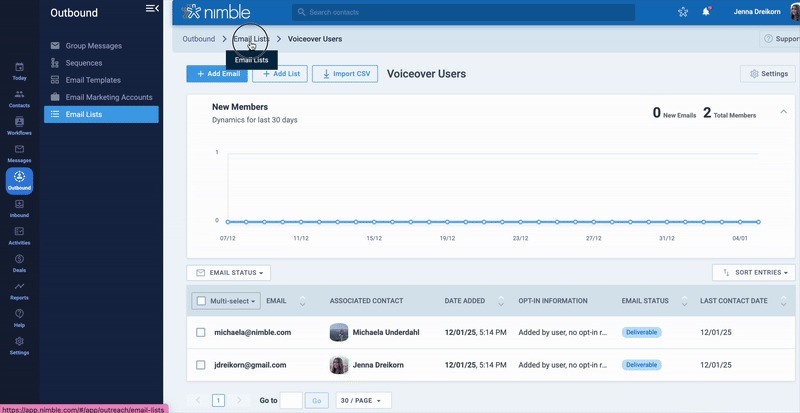
For example, when you’re viewing a specific email list, the navigation bar might look like this:
Outbound → Email Lists → Voiceover Users
Each part of the navigation bar is clickable:
- Click Outbound to return to the main engagement area
- Click Email Lists to view all available lists
- Stay on Voiceover Users to continue managing that list
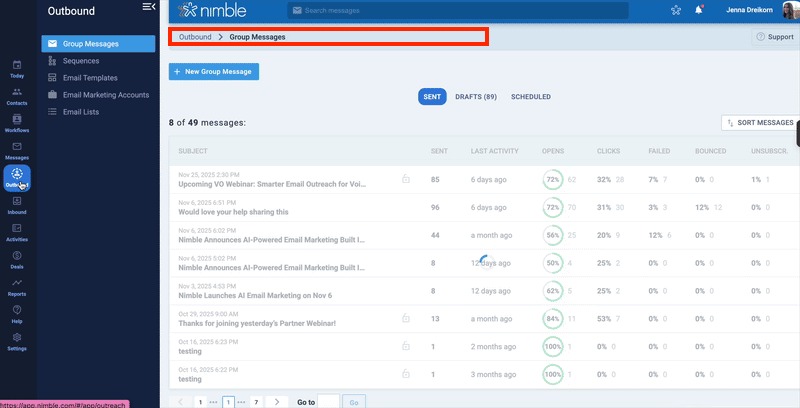
You can move up a level, check something quickly, and return right where you left off—without losing context.
Built for How You Move Through Nimble
As Nimble continues to grow, small usability improvements like navigation bars make a meaningful difference. By reducing friction and improving clarity, they help you move confidently across the platform.
With every level visible and clickable, navigation bars make it easier to understand where you are and quickly get back to where you were—so you can spend less time navigating and more time getting things done.
You’ll see navigation bars throughout Nimble wherever context matters most, supporting how you move through the app day to day.