
Last updated:
Most teams use email marketing for more than one purpose. They send product updates, sales outreach, follow-ups, and general communication—all to different audiences and at different stages of the relationship.
With Nimble, you can send email campaigns and sequences from multiple sender addresses under the same domain, making it easier to use the right sender for each type of message while keeping everything connected in one place.
Why Multiple Senders Matter in Email Marketing
As teams grow, email communication becomes more department-driven.
Sales, marketing, leadership, and customer care often communicate with the same contacts—but for very different reasons. A sales message, a marketing update, and a support follow-up shouldn’t all come from the same sender.
When every email comes from a single address, conversations can feel unclear or disconnected. Using multiple senders helps create clearer context around who is reaching out and why.
With multiple sender addresses, teams can:

Free Guide
The ABCs of CRM
A Beginner's Guide to Understanding &
Using a CRM
Download Free
You’re All Set!
DownloadGet the most out of this guide by starting your free 14-day trial of Nimble today.
- Send emails from the appropriate department or role
- Keep sales, marketing, and support communication clearly defined
- Run follow-ups and sequences that feel more natural and relevant
- Maintain a complete conversation history inside the CRM
How Teams and Solopreneurs Use Multiple Sender Addresses
Using multiple sender addresses helps teams and solopreneurs communicate more clearly across roles and departments, even when working with the same contacts.
Here’s how to get started with multiple sender addresses step by step:
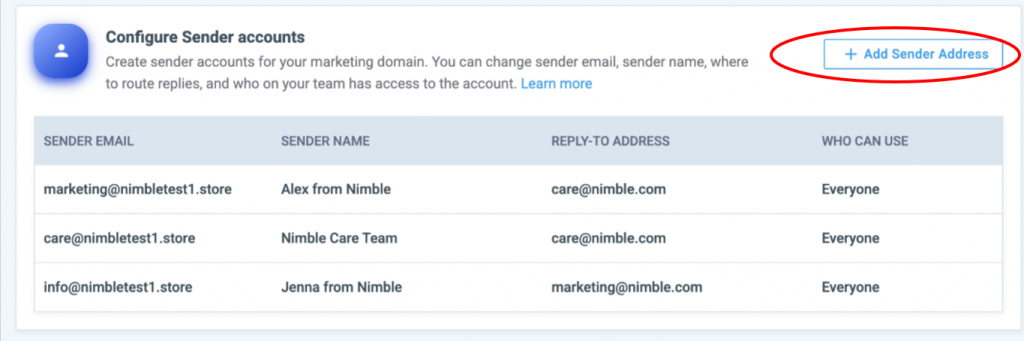
- Navigate to your Outbound Tab, then click “Email Marketing Accounts”
- Then click “Add Sender Address” button on the right
- You’ll be prompted to enter the sender email address, sender name, and reply-to address. You can also choose who on your team can use it:
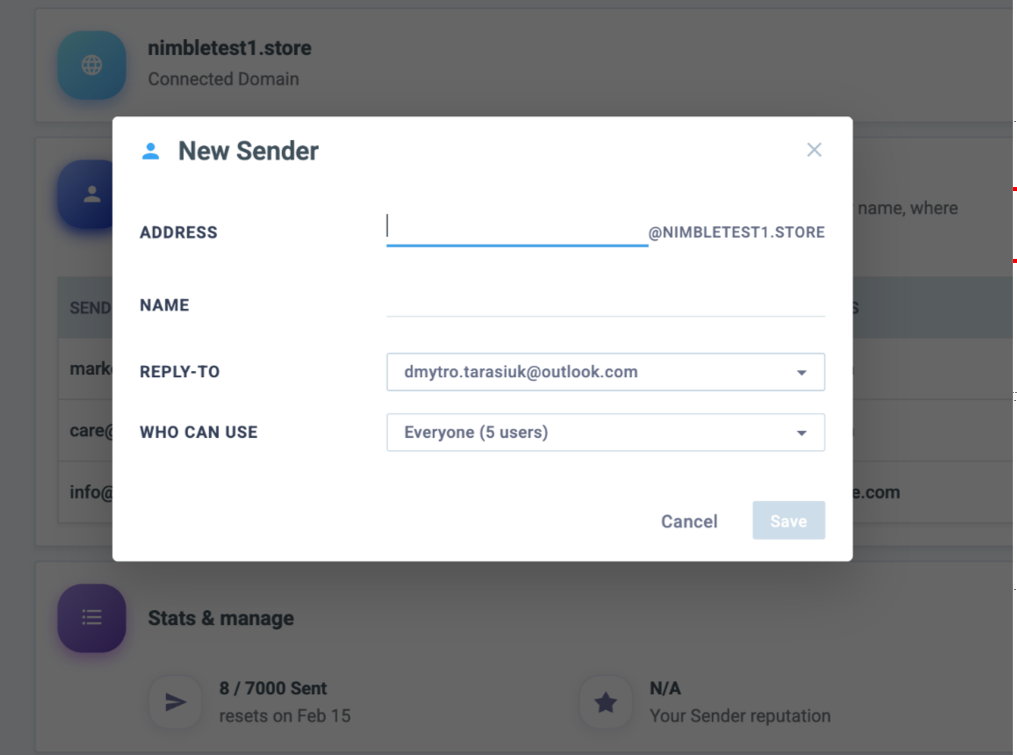
And just like that, you’re ready to start sending from multiple addresses!
Note: Multiple sender addresses are available for Email Marketing domains only. You’ll need Nimble Email Marketing enabled to use this feature.
Making Campaigns More Flexible
Multiple sender addresses give you more flexibility in how you run email marketing in Nimble. You can choose the right sender for different types of emails, keep communication consistent, and manage replies in one place. This is especially helpful as your outreach and sequences grow and become more complex.
For teams, multiple sender addresses also make collaboration easier. You can control who can use each sender address, keep engagement tied to the right contacts, and maintain visibility across campaigns. All of this helps you stay organized and scale your email marketing without adding extra tools.
For more details, check out our FAQ for common questions and best practices.