

Last updated:
The more digital we get, the more human we need to be.
That’s the line I keep coming back to, because the CRM industry spent the last decade going the opposite direction. CRM was supposed to stand for Customer Relationship Management. Somewhere along the way, the R got buried under the M. Today’s CRMs are reporting systems for managers — pipelines, forecasts, dashboards, automations. They optimize for extraction. Pound the prospect until they buy or die.
That’s why salespeople don’t live in their CRM. They live in Outlook and Gmail, in LinkedIn and Sales Navigator, in the human tools where the relationships actually happen. And to do their job, they bolt on Apollo, Outreach, ZoomInfo, Salesloft, Mailchimp — four or five disconnected tools, $500–$2,000 a month, four contact databases that never fully sync. Half the budget goes to making the tools talk to each other. Almost none of it goes to the relationship.
I lived this from the inside in 1989, when I co-founded GoldMine. I lived it again when I started Nimble in 2010. And I’ve watched, for fifteen years, as the rest of the category drifted further from the customer and deeper into the dashboard.
What Nimble is now
Nimble has always been about relationships. What’s changed in the last 18 months is the scope. We’ve taken the foundation — a CRM that lives where you live, in your inbox and your browser — and built the engagement engine around it that every relationship-driven person needs to do their job — whether they work alone or alongside a team.
There are three layers, and they all run on the same contact record. That last part is the whole point. One contact, one history — whether that’s a team finally seeing what every other person has done, or a solo founder finally seeing every conversation they’ve had with someone, in one place.
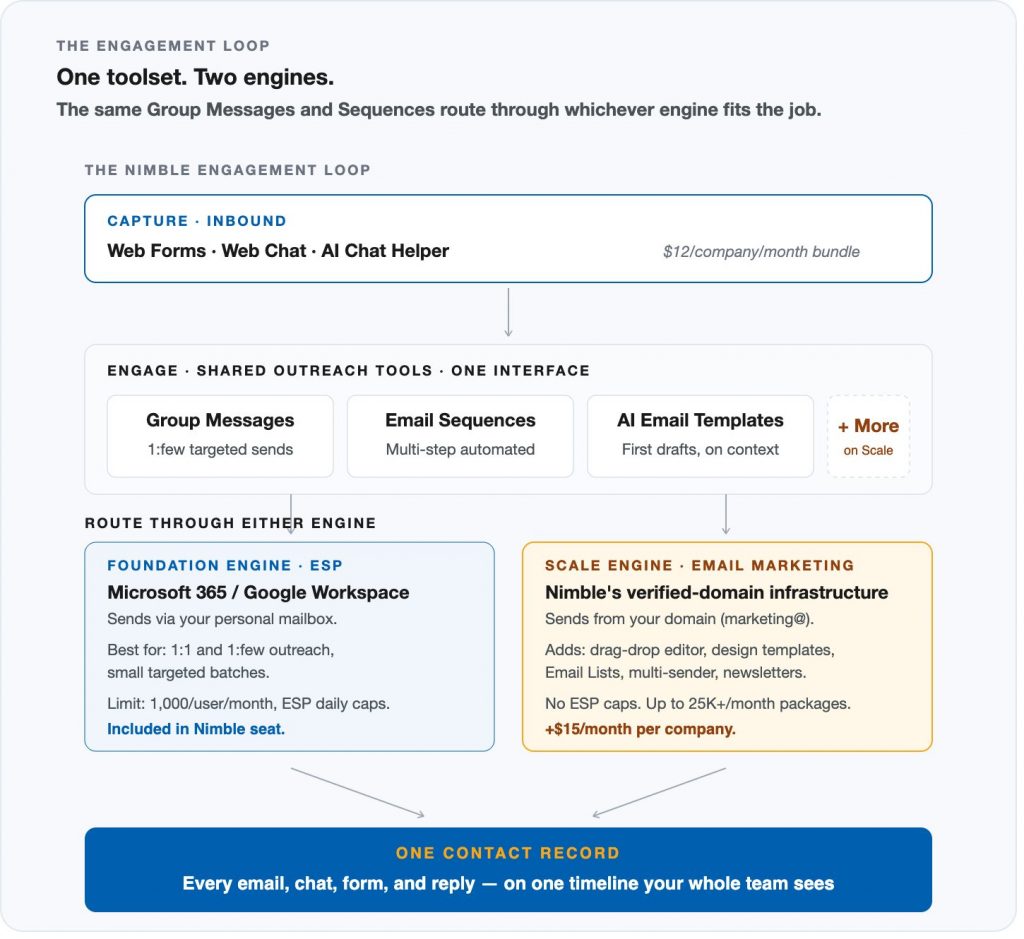
1. Inbound capture — the front door
Web Forms capture the visitors who are ready to raise their hand. Web Chat, which we just shipped, captures the ones still deciding. Together, they cover every visitor on your site. Each conversation, each form submission, automatically becomes a contact in Nimble — no Zapier, no manual entry, no CSV imports. AI Chat Helper engages visitors when your team is offline, asks the qualifying questions, and writes the session summary so the rep picks up Monday morning with full context.
2. Outbound engagement — two engines, one platform
This is the part most people miss. Nimble’s outbound has always had two engines, designed for two different jobs. Once you see the split, the whole platform clicks into place.
The tools are what everyone uses — whether you’re a solo founder running every conversation yourself or part of a team where the work is split across roles.
- Group Messages let anyone send a personalized message to a list of contacts — looks and feels one-to-one.
- Email Sequences automate a multi-step outbound campaign — email one, wait three days, email two, wait five days, email three — with smart exit conditions when someone replies, clicks, or unsubscribes.
- AI Email Templates draft the first version of either of those based on the relationship history. Same interface, whether you’re sending one or ten thousand.
The solo founder qualifying her own MQLs, the consultant warming up a referral, the sales rep working a pipeline, the BizDev pro opening a partner conversation, the PR person engaging a journalist, the marketer broadcasting a newsletter — they all use the same tools.
The engine is what changes underneath. By default, your Group Messages and Sequences are sent through your own Microsoft 365 or Google Workspace mailbox — the Foundation engine.
That’s how a sales rep sends to thirty prospects, or a business development rep nurtures fifteen partners, or a recruiter follows up with twenty candidates, and gets through their week. Personal sender identity, included in your seat, capped at 1,000 sends per user per month with normal ESP daily limits.
When the work outgrows that — a marketing newsletter to ten thousand subscribers, a press embargo to four hundred journalists, an investor update to every shareholder — you flip the same Group Messages and Sequences over to the Scale engine:
Nimble’s Email Marketing add-on. Same tools. Now they route through Nimble’s verified-domain infrastructure instead of your personal mailbox.
Send From Multiple Senders means your team can send from marketing@, news@, jenna@ — each with its own reply-to routing, all under one verified domain. And the engine layers in features the ESP-based Foundation engine doesn’t have: a drag-and-drop email builder, professionally designed templates, Email Lists for managing subscribers and unsubscribes, and broadcast packages up to 25,000+ messages per month. HubSpot-grade marketing infrastructure, $15/month per company, sitting under the same toolset your reps already use.
3. The contact record — where it all lives
Every chat, every form submission, every email sent through Foundation, every campaign sent through Scale — they all land on one place. The contact timeline. Your whole team sees it. The marketer can see what the sales rep sent yesterday before scheduling a campaign tomorrow. The BizDev rep can see whether the prospect engaged with the press piece before reaching out about the partnership. The contact record is the unit, not the deal.
Foundation vs. Scale — side by side
The same Group Messages, Email Sequences, and AI Email Templates work through either engine. Here’s what changes when you flip from one to the other:
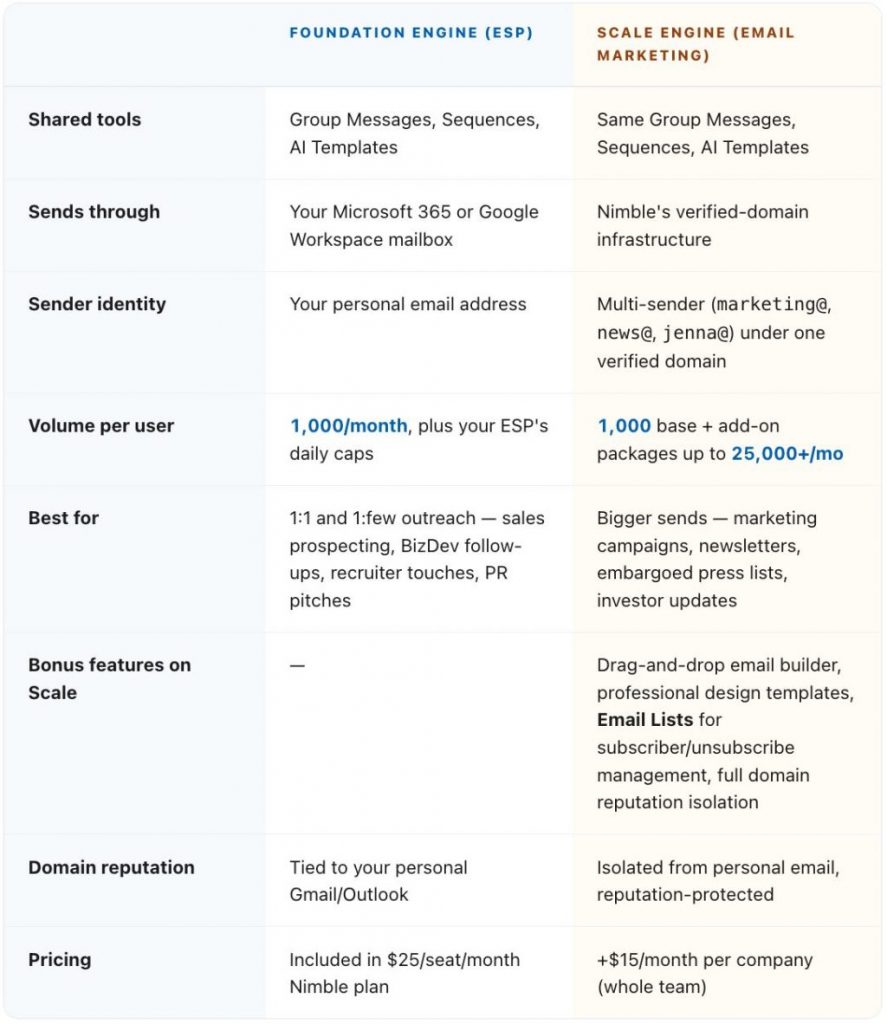
Most teams start with Foundation and add Scale when the work outgrows what a personal mailbox can carry — the marketing team needs marketing@ as a sender, the newsletter list crosses a few thousand, the volume picks up. You can run both at once. A rep sends 1:1 through their own mailbox, the marketing team broadcasts ten thousand through news@, and both land on the same contact timeline.
Who actually uses this
Here’s the part that took me thirty-five years to get right: this isn’t a sales tool. It’s an engagement platform. Whether you wear every hat yourself or your team has six different people doing six different things, everyone uses the same toolset — Group Messages, Sequences, AI Templates — and picks the engine that fits each send.
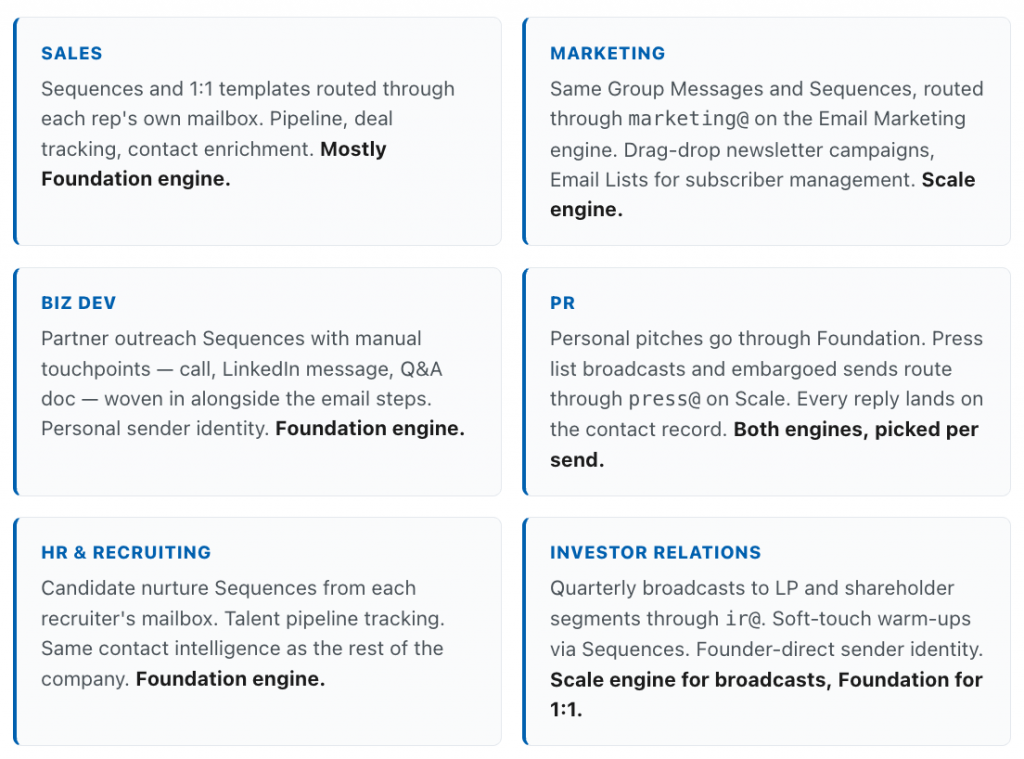
Six different roles, one platform.
One contact record. One toolset. Two engines that fit the work.
For a solo founder or consultant, that means every hat you wear shares the same view of every relationship — the prospect you pitched yesterday, the partner you’re courting next week, the journalist you sent a press kit to last month, all on one timeline.
For a team, the marketing person running an outbound campaign can see that the BizDev rep already reached out to a prospect about a partnership.
The sales rep about to call a lead can see they came in through Web Chat, asked about pricing, and already received the welcome Sequence.
Everyone — whether that’s a team or just you — is finally working from the same map.
What would this cost on HubSpot or Salesforce
Most teams reading this already know the alternative. To do what Nimble just described — inbound capture, outbound engagement, contact intelligence, all on one record — on HubSpot or Salesforce, you’d need to buy multiple products and stitch them together. Here’s the math for a small team that wants the same loop.
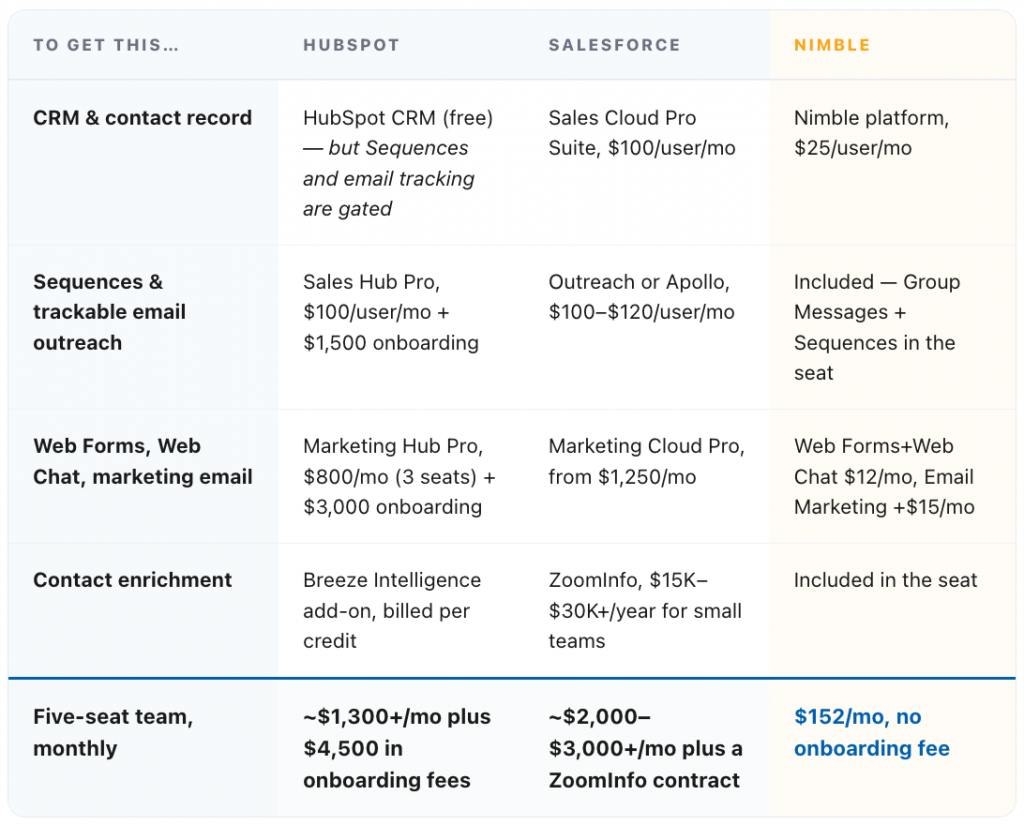
Pricing as published on hubspot.com and salesforce.com as of April 2026 (Sales Hub Professional, Marketing Hub Professional; Sales Cloud Pro Suite, Marketing Cloud Pro). Actual costs vary by seats, contract terms, contacts, and add-ons; HubSpot Marketing Hub additionally bills per marketing contact above its included tier. Five-seat math is illustrative; ZoomInfo and Outreach require separate annual contracts and are typically negotiated per organization.
To be fair to the alternatives, HubSpot Marketing Hub Pro and Salesforce Marketing Cloud do more than Nimble’s Email Marketing add-on.
They include landing pages, A/B testing, lead scoring, attribution reporting, and a much deeper marketing automation graph.
Outreach is genuinely better than Nimble Sequences if your sales team needs conversation intelligence, multi-step branching, and SDR coaching dashboards.
ZoomInfo’s contact data is more comprehensive than Nimble’s enrichment. If those things matter to your business and the spend is justified, those products are doing real work.
But for the SMB team or solo principal who wants the engagement loop — capture, engage, see everything on one timeline — without paying enterprise prices for enterprise complexity?
That’s what Nimble is built for. One platform, one contract, one toolset, two engines, no four-vendor stack to negotiate, integrate, and replace every two years.
Why this matters now
Three things have converged to make 2026 the moment.
The market is consolidating. SMB teams are tired of paying for Apollo and ZoomInfo and Mailchimp and Salesloft to do what one platform should do. They’re cutting their stacks. But the bundled platforms they’re moving to — HubSpot, Salesforce — are priced for the enterprise, not for the 12-person team that actually runs on relationships.
AI made relationship intelligence economically real. Two years ago, turning every email, chat, and meeting into structured contact intelligence wasn’t feasible. It is now. AI Chat Helper, AI Email Templates, contact enrichment — all of it runs on this shift. We’re using AI to surface the relationships that matter, not to send more spam.
Relationship-driven teams want their tools back. Recruiters, consultants, advisors, agencies, real-estate teams, BizDev professionals — businesses whose work is a network, not a funnel — have been served for fifteen years by tools designed for transactional sales. They never fit. Now there’s something that does.
The relationship is the asset
I built GoldMine in 1989 because I believed the relationships you already have are your most underleveraged business asset. That hasn’t changed. What’s changed is what’s possible. In 1989, we could keep a contact record. In 2010, we could score a relationship from social signals. In 2026, we can finally give every relationship-driven person — the solo founder, the consultant, and every member of every team — the same toolset, the same intelligence, the same view of every relationship, and let them work it without bolting four more tools onto their day.
That’s what Nimble is now. Not a CRM with marketing bolted on. The engagement platform for the whole company.
Web Chat closes the inbound capture loop. The platform is ready for the whole company today. More channels are on the way — outbound and inbound texting, voice — because relationships happen wherever your customers want to talk to you. What you do with what’s here now is up to you, and to the team you’re trying to empower.
Ready to see it?
Join us May 21, 1pm EDT for the Web Chat walkthrough — 30 minutes, start to finish, no commitment.
Reserve your spot →P.S. If you’re an existing Nimble customer reading this from one of our launch emails: Web Chat is already in your account at no extra cost if you have Web Forms. If you don’t, the bundle is free for 30 days. The May 21 walkthrough covers everything in this post. — Jon