


Last updated:
We’re excited to share a brand-new way to connect with potential customers: Nimble Web Chat is here!
Now you can start conversations with leads the moment they land on your site. Whether you’re answering quick questions or following up later, Web Chat makes it easy to turn interest into opportunity—without juggling extra tools.
What Is Web Chat?
Web chat is a real-time messaging tool that lives on your website. It lets visitors reach out with questions, comments, or requests while they’re actively browsing your content. Unlike email or forms that can create delays, web chat opens the door to instant connection—right when interest is highest.
It’s become a go-to channel for businesses that want to engage faster, qualify leads on the spot, and offer a more personal touch.
With Nimble Web Chat, we’ve made it easy to bring this kind of engagement to your site—without adding another tool to manage. You can chat with leads, track conversations, and follow up, all from within your Nimble workspace.
Catch and Connect with Leads Faster Using Web Chat
Small teams need tools that keep things simple and effective. Instead of adding more software to manage, you want a solution that helps you connect with visitors quickly—right when they’re most interested—and keeps everything organized in one place.
Web Chat turns your website into an active conversation starter, capturing the right moments to engage leads before they leave. It helps you build relationships faster and stay personal without the hassle of juggling multiple apps.
Plus, every conversation is automatically saved and linked to the contact’s record in Nimble. That way, you always have the full context for follow-up—no important messages get lost or forgotten.
Here’s how sales and marketing teams are putting Web Chat to work:

Free Guide
The ABCs of CRM
A Beginner's Guide to Understanding &
Using a CRM
Download Free
You’re All Set!
DownloadGet the most out of this guide by starting your free 14-day trial of Nimble today.
- Sales teams use Web Chat on the pricing page to jump in when leads hesitate, answering questions and keeping deals moving forward.
- Marketing teams add chat to campaign landing pages to engage high-intent visitors immediately—before they fill out a form or bounce.
- Sales reps connect with visitors on the services page to answer quick questions and book calls in real time.
- Support teams speed up resolutions by chatting live with customers browsing the FAQ section, cutting down email back-and-forth.
- Founders and small teams use Web Chat on the homepage to greet visitors personally, turning curiosity into a meaningful connection.
By making conversations easy, accessible, and trackable, Web Chat helps your sales and marketing teams engage smarter and close faster—all within Nimble.
What You’ll Get with Nimble Web Chat
Web Chat is more than just a messaging widget—it’s a new way to turn website traffic into leads and stay on top of every conversation, all within Nimble.
Here’s what you’ll be able to do:
- Create multiple chat widgets for different pages, campaigns, or teams—each with its own customizable welcome message.
- Engage leads automatically with a message that appears when someone opens the chat. You can personalize this message to reflect your brand and start the conversation on the right foot.
- Track every conversation like a lead form. Each chat is saved as a response in Nimble so you never lose the context of who said what and when.
- Assign and manage chats with clear status labels— Open or Closed—so your team always knows what needs follow-up.
- Collaborate with your team by reassigning chats at any time and keeping conversations moving even if someone’s away.
- Get notified when it matters with real-time alerts for new messages, new chats, or chat assignments—delivered via popups or desktop notifications.
- Stay organized by naming your chat widgets and keeping track of multiple open conversations at once.
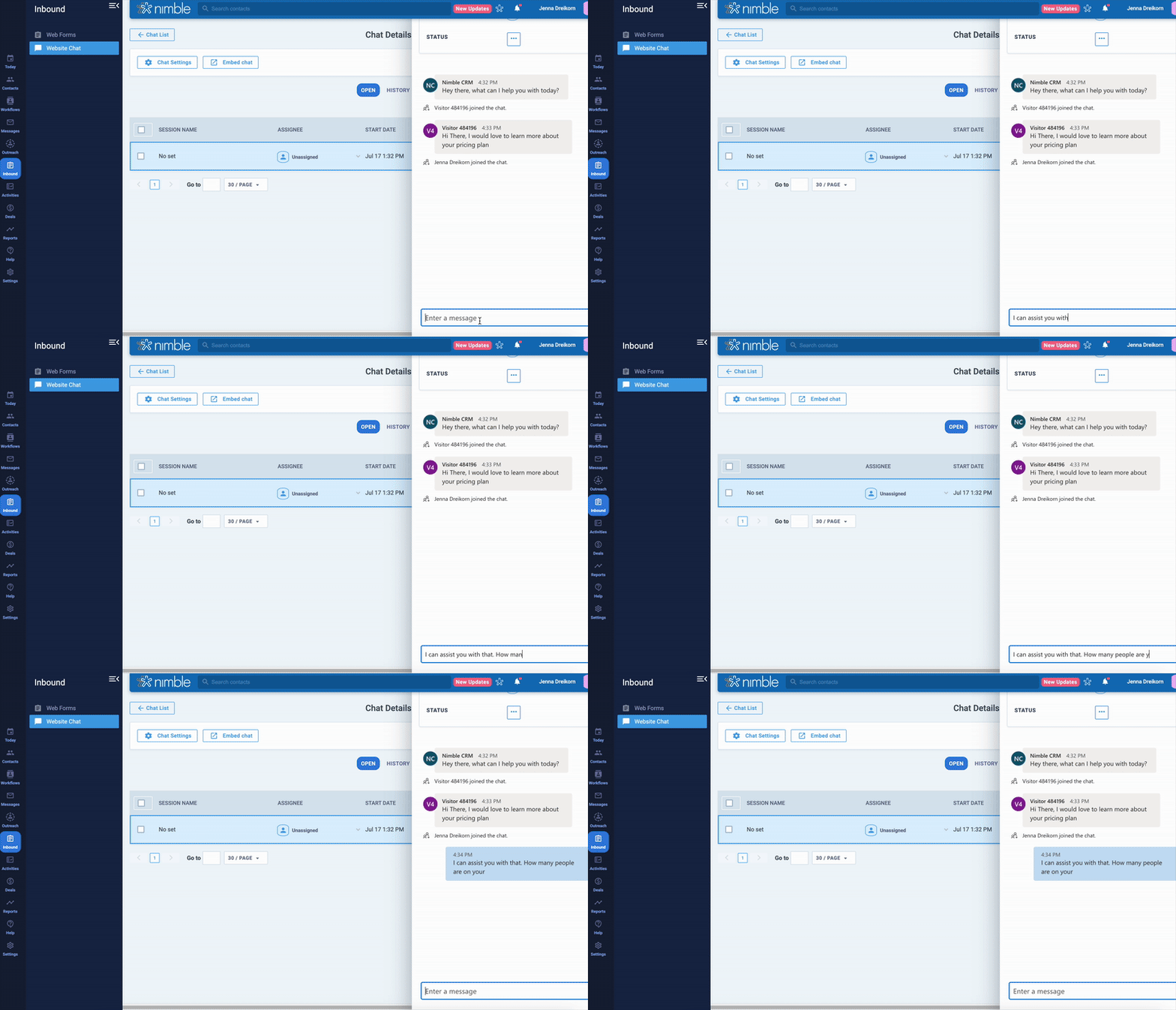
How to Set Up Nimble Web Chat
Getting started with Web Chat only takes a few minutes. Here’s how to set it up:
- Go to the Inbound Tab in Nimble.
- Click “Website Chat” then “Create New Chat.” Give your chat a name to keep things organized—especially if you’re managing multiple chats.
- Add a starting message. This is what visitors will see when they open the chat, so make it welcoming and helpful!
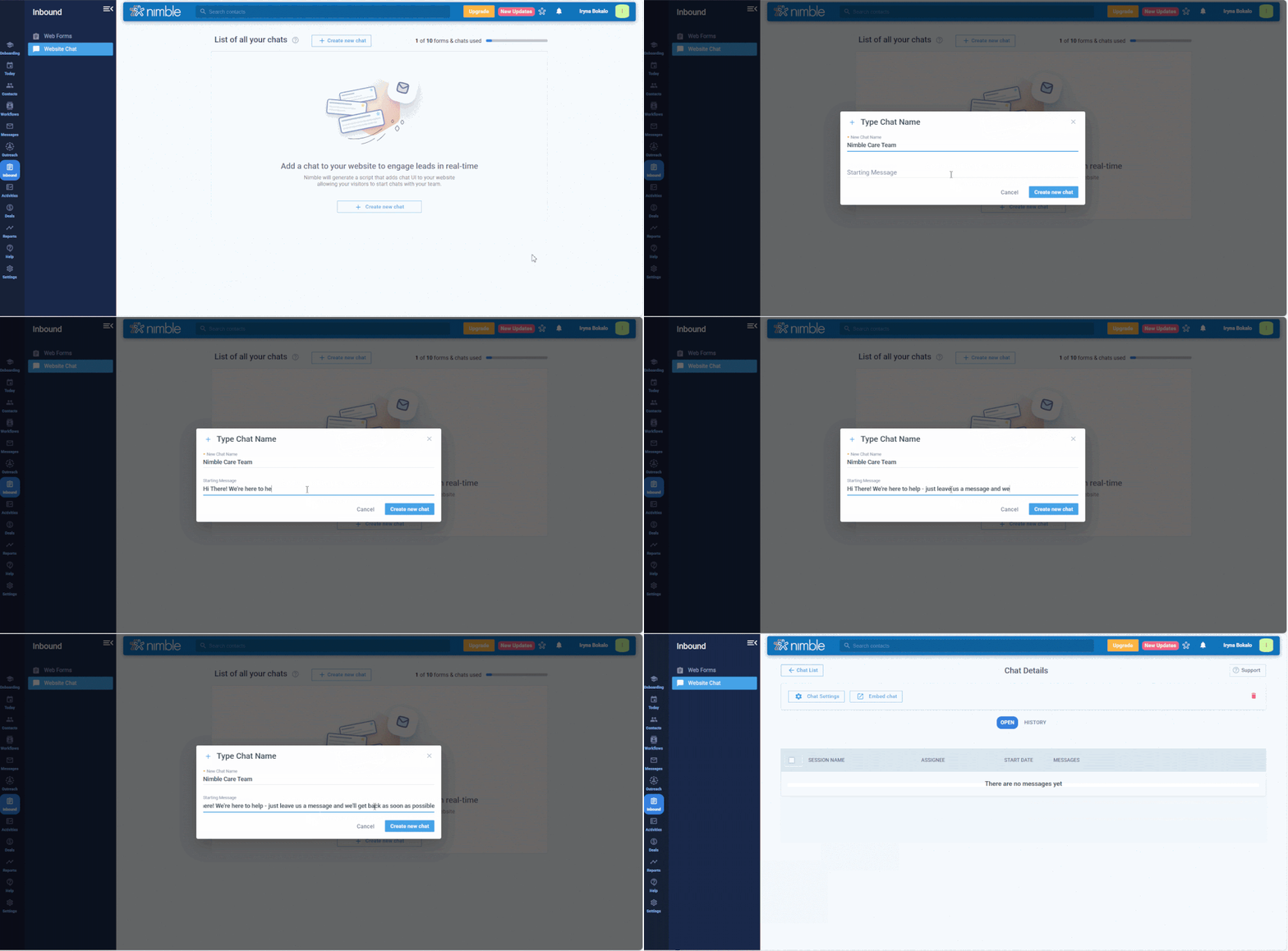
- To embed Web Chat on your website, just click the Embed button and copy the code provided. Paste it into your site’s HTML where you want the chat to appear.
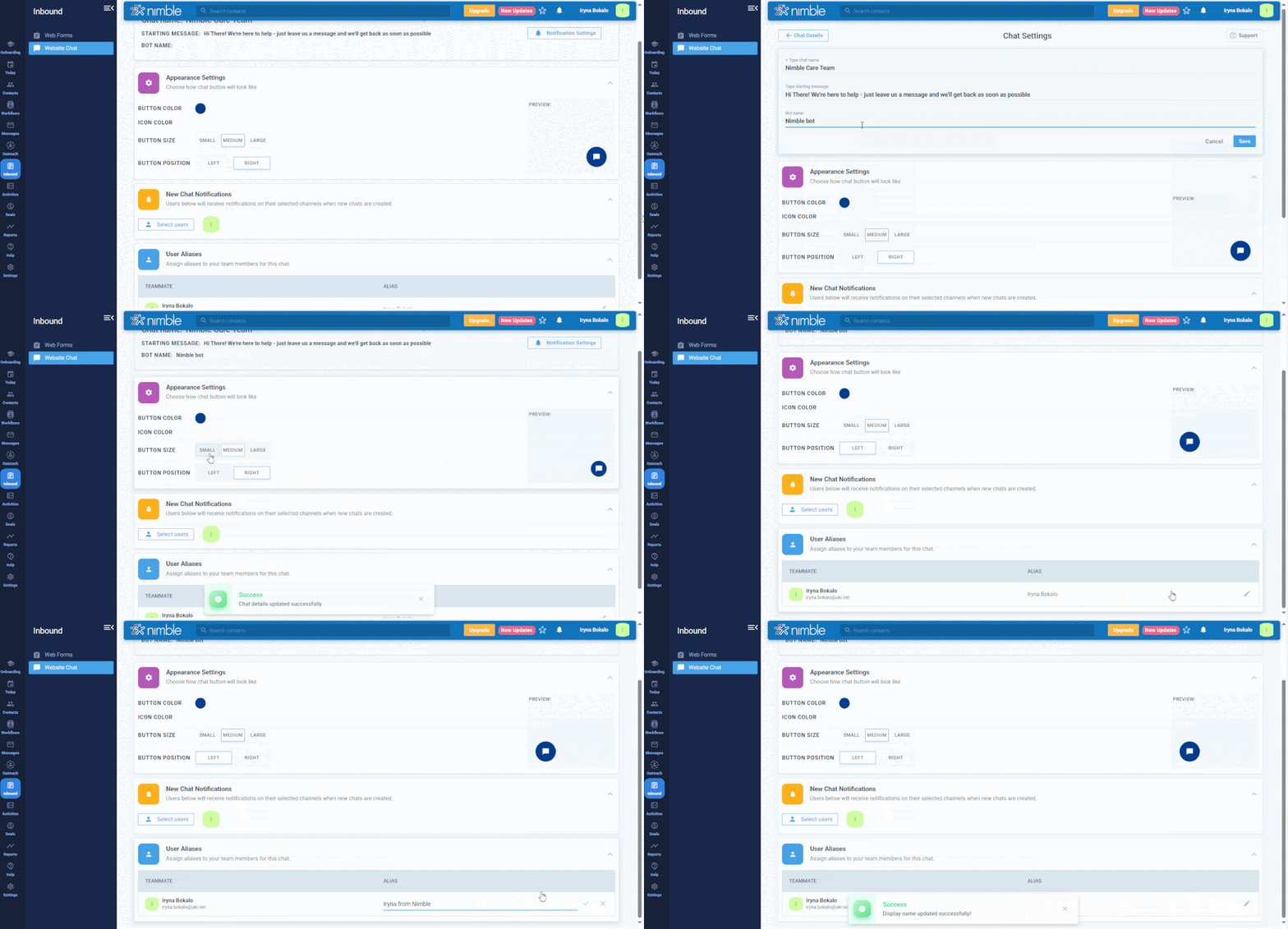
Need help? Follow detailed steps here → - To customize appearance and notification settings, click the Settings button:
- Update the color and font to match your branding
- Choose which team members should receive chat notifications when someone sends a message
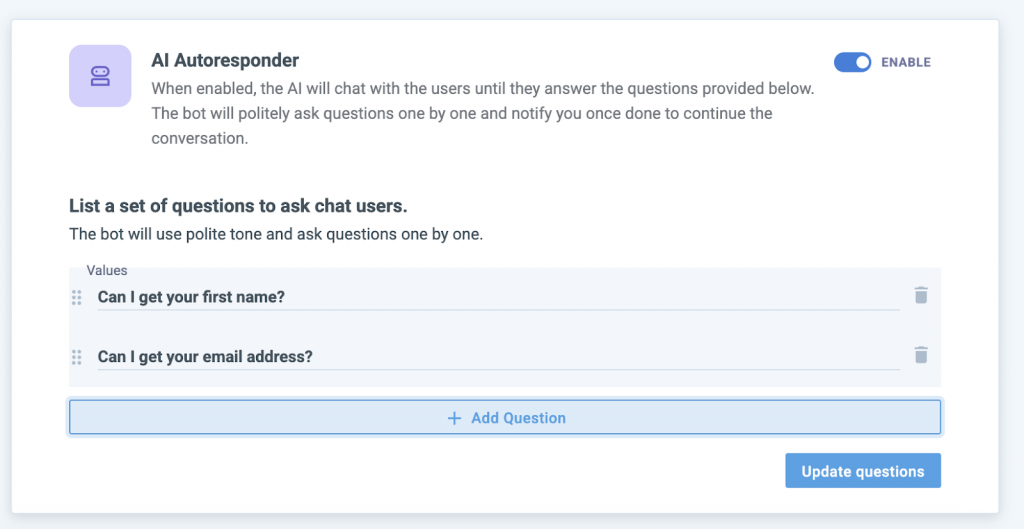
6. Enable AI Responder to Automatically Engage Visitors:
Start with simple questions like “What’s your first name?” or “Can I get your email to follow up?” to capture key details. Then, ask quick qualifiers—such as “What brings you here today?” or “What’s your biggest challenge?”—to learn their needs and intent.
Why it matters: Each question is a way to gather useful info, build rapport, and guide visitors toward the right next step, even when you’re not online.
That’s it! Once live, your team can start chatting with leads in real time—no extra tools needed.
Part of a Growing Engagement Toolkit
Nimble Web Chat is here—the easiest, most cost-effective way to turn website visitors into leads—now bundled with Nimble Web Forms for just $12/month per company. No paying for multiple tools. No messy integrations. Just real-time conversations and instant lead capture, fully connected to your Nimble workspace.
Here’s the best part—if you’re already paying for Web Forms, you already have access to Web Chat at no extra cost. It’s included in your existing bundle, along with 10 shares you can split between Web Forms and Web Chats in any way you choose. That’s up to 10 lead capture touchpoints across your site without spending a penny more.
Plus—this is just the beginning. We’re launching with the essentials so you can start chatting with prospects right away, and we’ll continue adding new capabilities to make Web Chat even more powerful over time.
👉 Have questions about setup or how it works? Check out our FAQ for all the details.
