
Last updated:
Most teams still write outreach emails in one tool, manage contacts in another, and track engagement somewhere else. That fragmentation wastes time, breaks context, and makes it harder to deliver messages that truly connect.
With Nimble’s new AI-Generated Email Tool and Template Gallery, you can finally create personalized, on-brand emails inside your CRM—where your relationships already live. No more copying data between tools or losing track of what’s been said.
Now, every outreach becomes faster, smarter, and more consistent—powered by AI that understands your intent and a shared library of proven templates that keep your team aligned. It’s personalization at scale, built right into the system you use every day.
AI That Understands Your Goal and Writes Like You Would
Every conversation starts with context—who you are, who you’re reaching out to, and why. Nimble’s AI Email Generator takes that intent and turns it into a clear, personal message that fits the relationship.
You simply tell Nimble what you want to accomplish, and the AI uses your intent—along with what it knows about you and your contact—to generate a ready-to-send email. For example:
- You’re a sales rep reaching out to a new lead you just discovered through Nimble Prospector. Choose the “New Prospect” intent, and Nimble drafts a warm, introductory note that references the contact’s company and role.
- You’re a marketer following up with attendees after a webinar. Select “Event Follow-Up,” and Nimble creates a personalized recap email that thanks each contact by name and encourages them to explore your next campaign.
- You’re a founder reconnecting with a past customer. Use the “Re-engagement” intent, and Nimble helps you write a thoughtful check-in message that feels natural and authentic.
By combining your goal with contact insights already in your CRM, Nimble turns what used to be a blank page into a polished, professional email that sounds like you.
This intent-based approach doesn’t just save time—it helps every message feel personal and relevant. Sales teams move faster through outreach lists, marketers send consistent campaigns, and business owners can focus on relationships instead of rewriting from scratch.
Getting Started with the AI Email Generator
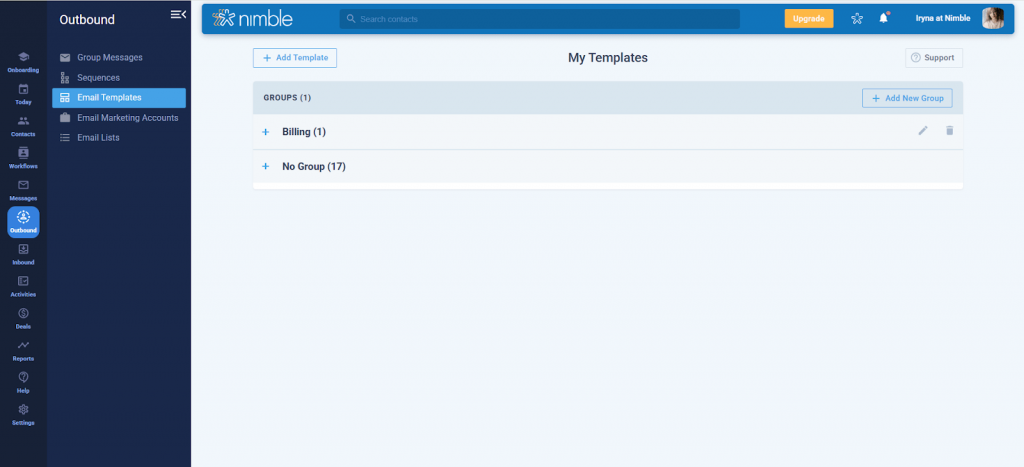
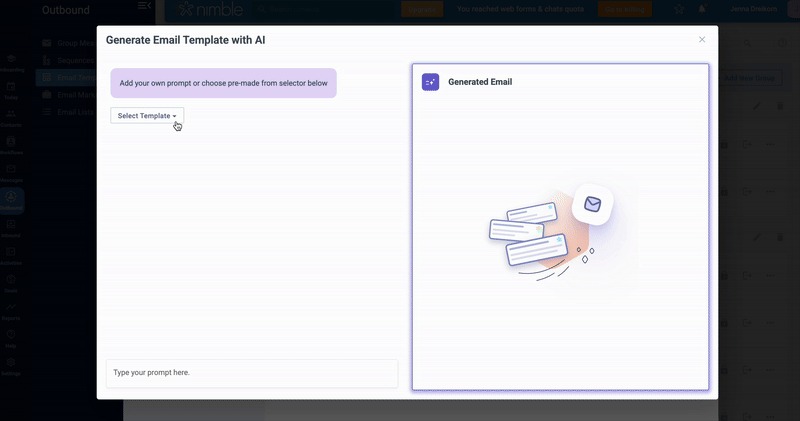
You can find the AI Email Generator under the Outbound tab by navigating to Email Templates and selecting Generate AI Email.
From there, you’ll see an intent dropdown that helps guide the type of message you want to create. The available intents include categories such as Sales, Marketing, and PR, each designed to fit common communication goals like introductions, follow-ups, re-engagements, or announcements.

Free Guide
The ABCs of CRM
A Beginner's Guide to Understanding &
Using a CRM
Download Free
You’re All Set!
DownloadGet the most out of this guide by starting your free 14-day trial of Nimble today.
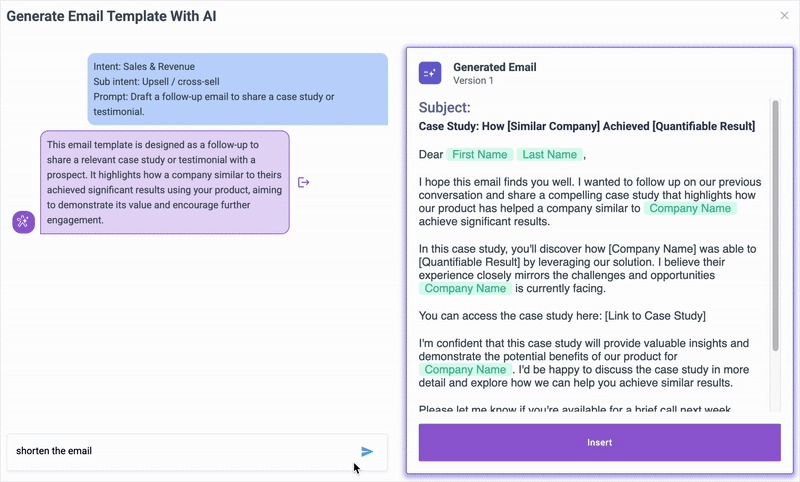
You can also access the AI Email Generator directly from a contact record. On any contact page, select Message, then open the command menu to launch AI Writing. This makes it easy to create contextual outreach using the contact’s history and engagement details.
Once you select an intent, Nimble’s AI generates a draft that matches your chosen purpose. You can then refine the result by giving more detailed instructions in the AI chat box, just as you would with any other AI writing tool. For example, you can ask it to simplify the tone, avoid certain phrases, or make the message sound more conversational. This gives you full control over both the style and structure of your email before saving or sending it.
Save and Organize Your Best AI Emails with
the New Template Gallery
Once you’ve created an effective AI-powered email, you can turn it into a reusable template so your best messages never get lost. Nimble’s new Template Gallery makes it easy to save, organize, and share those winning emails—all without leaving your CRM.
The gallery supports both text-based and visual templates, giving you the flexibility to choose the right format for each type of outreach. Use text templates for quick, personal follow-ups that feel one-to-one, or visual templates for branded campaigns and announcements that showcase your company’s look and feel.
Here’s how teams use it:
- Save AI-generated emails as reusable templates for future outreach.
- Group templates by category, such as Sales, PR, or Marketing.
- Share templates across your team to keep communication consistent and on-brand.
As your library grows, the Template Gallery becomes more than just storage—it’s your team’s collective playbook of high-performing messages, helping everyone move faster and maintain a unified voice across every channel.
Choose Between Visual and Text-Based Templates
Nimble now supports both visual templates and new text-based templates, giving you flexibility in how you communicate.
- Visual templates are designed for branded, image-rich layouts that fit marketing campaigns or announcements.
- Text-based templates are simple, plain-text versions that feel more personal—ideal for direct outreach, follow-ups, or one-to-one communication.
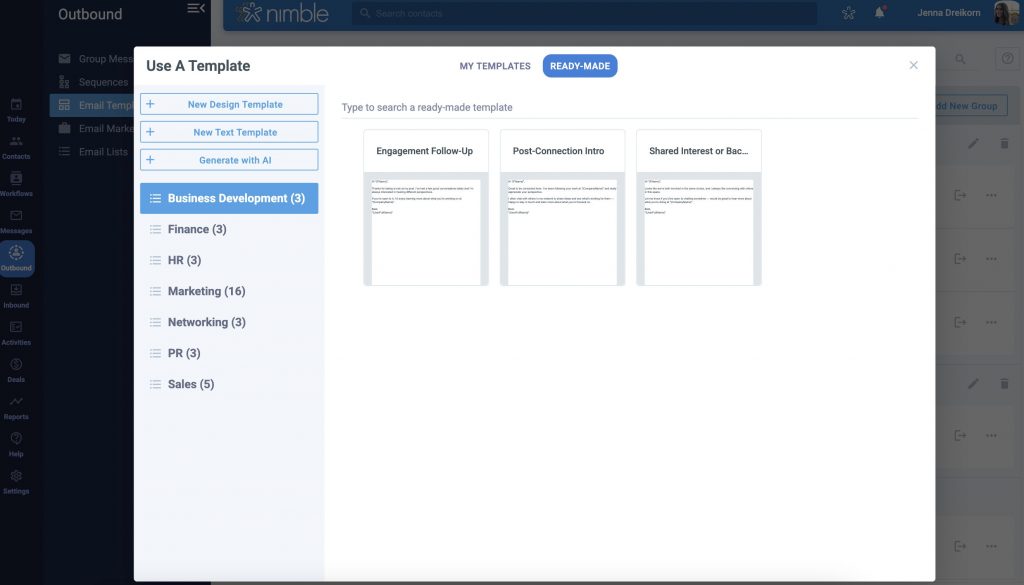
Over time, your Template Gallery becomes more than just a library—it’s a shared workspace where your organization’s most effective communications live, ready to be reused, refined, and scaled.
Navigating Email Templates in Nimble
Save and Organize with the Template Gallery
You can manage, search, and reuse your saved content directly from Nimble’s Template Gallery. Here’s how to get started:
- Navigate to the Outbound tab in your main menu.
- Select Email Templates to open your gallery.
- Use the search bar to find templates by name, keyword, or topic.
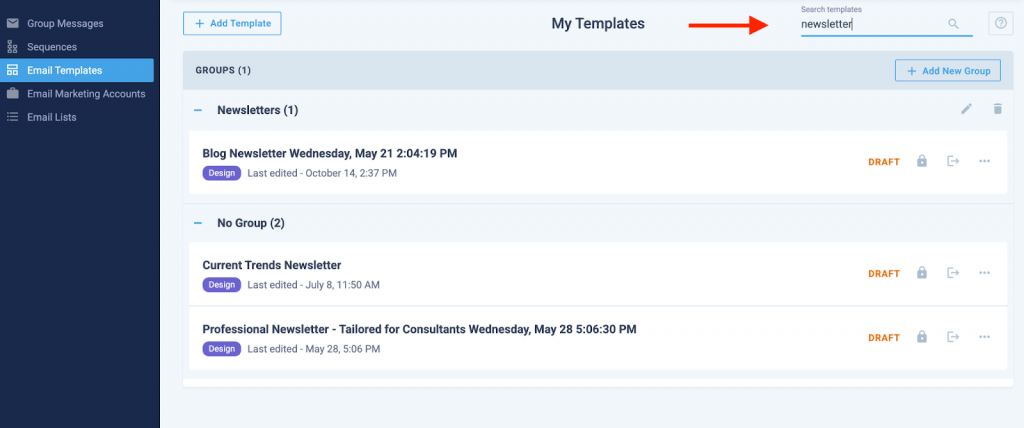
The search feature makes it easy to locate specific templates—especially as your library grows. Once you find the message you need, you can organize it by creating groups for different categories such as Sales, PR, or Marketing. This helps teams keep messages structured and ensures consistent communication across campaigns and departments.
Creating and Managing Template Groups
You can organize your templates into groups to keep related messages together and make them easier to find. Here’s how:
- Go to Outbound > Email Templates in your main navigation.
- Select New Group
- Name your group clearly based on its purpose—for example: “Sales Follow-Ups” or
“Marketing Campaigns”
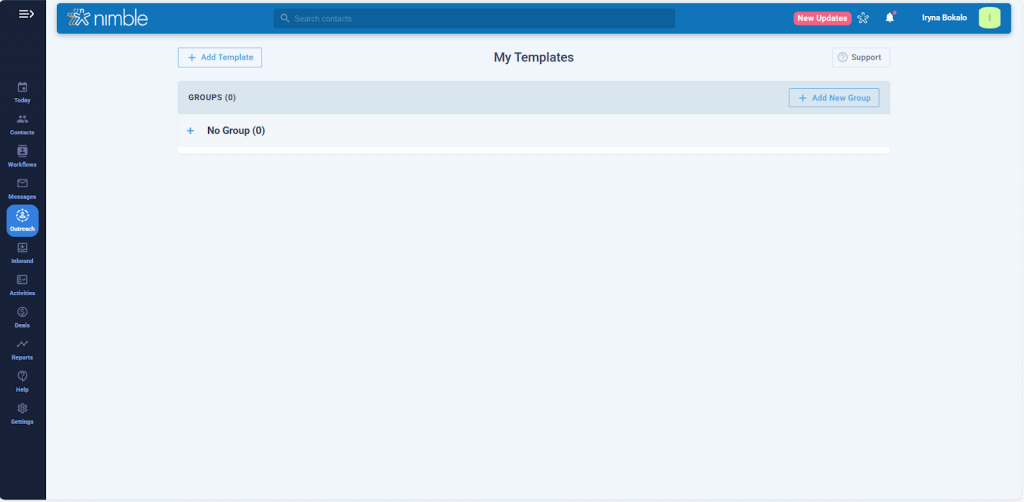
- Move existing templates into a group by selecting the template, then choosing Move to Group icon
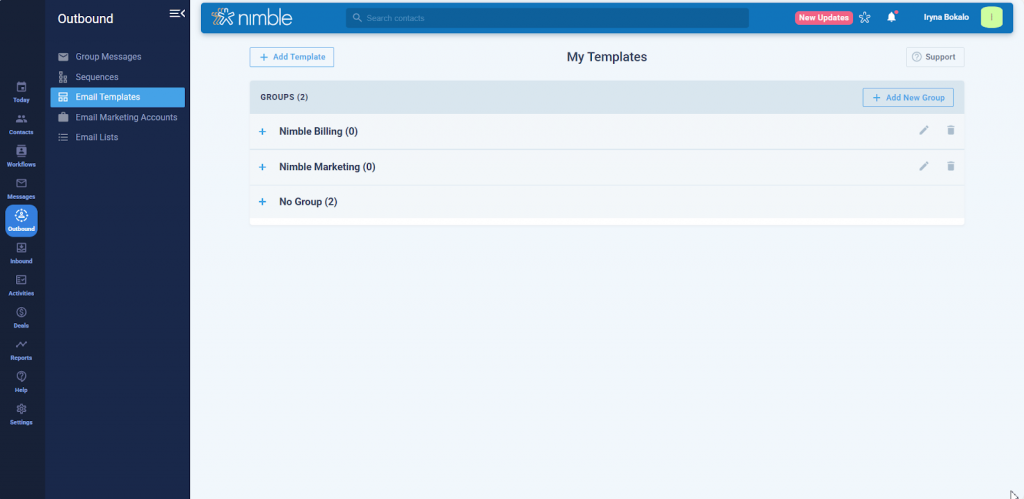
Creating and managing groups helps maintain structure as your template library grows. It ensures everyone on your team can quickly locate, reuse, and maintain consistent messaging across campaigns.
How Teams Can Use AI Writing and Templates Together
AI Writing, Templates, and Groups give teams a more efficient and scalable way to communicate across every stage of the customer journey. From outreach to retention, these tools help maintain clarity, consistency, and brand alignment without adding complexity or manual effort.
Here are a few ways different teams can use them in practice:
- Sales Teams can use AI Writing to generate personalized outreach tailored to each prospect’s context and intent. When a message performs well—such as a follow-up that drives engagement—it can be saved as a text-based template and organized in a Sales Follow-Ups group. This allows every sales rep to send polished, on-brand messages quickly, improving response rates while maintaining consistency.
- Marketing Teams can build visual templates for branded campaigns, product announcements, or event invitations. By organizing them into groups like Campaigns, Product Launches, or Events, teams can easily find and reuse proven messaging. This approach helps marketing maintain a cohesive voice across multiple channels while reducing time spent rebuilding similar content.
- Customer Success Teams can create organized libraries of onboarding, renewal, and customer check-in emails. AI Writing helps tailor tone and phrasing for different customer segments, while template groups ensure that every team member communicates with the same professionalism and empathy.
- Partnership and PR Teams can use AI Writing to craft press releases, collaboration proposals, and partner outreach emails that sound professional and natural. Templates for announcements or partnership updates can be grouped under Press Outreach or Partner Relations, allowing teams to reuse and adapt them as new opportunities arise.
By combining AI Writing with a structured template system, teams can create communication frameworks that scale. Instead of rewriting the same messages, each department builds on shared assets—improving alignment, saving time, and keeping every interaction on-brand.
Start Creating Smarter Emails in Nimble
Nimble’s AI Writing and Template Gallery make it easier to create polished, on-brand communication across every stage of customer engagement—from one-to-one outreach to large-scale email marketing campaigns.
With AI that understands your intent and templates that keep your team organized, you can write faster, stay consistent, and deliver messages that feel both personal and professional. The same tools that help you craft individual follow-ups can also power your marketing campaigns, giving your business a unified way to connect with prospects and customers at scale.
Whether you’re nurturing leads, following up after meetings, or launching your next campaign, Nimble brings it all together—so every email you send supports stronger relationships and measurable growth.For a deeper walkthrough of how to get started, read the full support article.