
When Arleen Ferrara opened her new pottery studio, she had three main goals:
- Bring awareness to the new studio space
- Attract leads from people interested in pottery and workshops
- Keep the community updated on events, classes, and announcements
To get started, she built a beautiful website using Squarespace, which made it easy to showcase her studio and allow visitors to sign up for updates. But as interest grew, Arleen quickly ran into challenges:
- Squarespace forms only capture leads — nothing more
Visitors could submit their information, but there was no simple way to organize contacts, track conversations, or manage follow-ups on an ongoing basis. - Email marketing required costly upgrades
To send newsletters or updates, Arleen would have to upgrade to a higher-tier Squarespace plan and pay additional fees based on the number of contacts and email sends. - Managing communication manually wasn’t scalable
Without a centralized system, leads were scattered across Squarespace with no actionable processes, making it hard to send studio updates, promote events, and manage registrations.
That’s when Arleen turned to her husband, Jon Ferrara, CEO of Nimble CRM, to help her set up a more efficient and affordable system for managing her growing community.
Creating a Streamlined, Cost-Effective System
Instead of relying on multiple Squarespace upgrades, Arleen and Jon connected her website to Nimble CRM, turning it into a complete studio growth platform for $29.90 per month.
Now, with Nimble in place:
- Leads captured on the Squarespace site now flow directly into one central database in Nimble.
- Arleen can organize contacts, manage her growing audience, and track interactions with all in one place.
- She uses Nimble’s built-in email tools to share updates, promote workshops, and announce upcoming studio activities — all included in her plan.
Jon also helped Arleen create custom email templates to make her outreach effortless and consistent. Unlike Squarespace, which charges more as contact lists grow and sends increase.

Free Guide
The ABCs of CRM
A Beginner's Guide to Understanding &
Using a CRM
Download Free
You’re All Set!
DownloadGet the most out of this guide by starting your free 14-day trial of Nimble today.
“With Nimble, we didn’t have to keep upgrading Squarespace just to stay connected with people,” Jon explains. “Everything we need to capture leads, grow awareness, and keep people informed is built into one simple platform.”
From Capturing Leads to Nurturing Relationships:
Arleen and Jon’s Process
To grow the studio and build a connected community, Arleen and Jon created their process — a simple, streamlined system using Nimble CRM + Squarespace. It takes visitors from their first sign-up to staying engaged with updates, newsletters, and workshop announcements, making it easy to manage relationships every step of the way.
1. Create a Nimble Web Form
They began by creating a custom web form in Nimble to collect sign-ups for studio updates, workshops, and announcements. The form captures key details like name, email, and areas of interest, and Nimble automatically tags each new contact based on their preferences.
- Captures essential info like name, email, and interests
- Auto-tags contacts for seamless organization in Nimble

2. Embed the Form on the Squarespace Site
Next, they embedded the Nimble form on strategic pages of the Squarespace website, including the homepage, workshop landing pages, and a dedicated Contact page. This ensures visitors have multiple opportunities to sign up and stay connected.
- Forms placed on high-traffic and relevant pages
- Easy for visitors to join from anywhere on the site

3. Automatically Organize and Add to Workflows
Once someone submits a form, Nimble automatically tags the contact and places them into the right workflow. Subscribers interested in workshops go into a “Workshop Updates” workflow, newsletter sign-ups enter “Newsletter List,” and general sign-ups are sorted into “Announcements.”
- Automates contact sorting and segmentation
- Ensures follow-ups are timely and relevant

4. Build Branded Email Templates
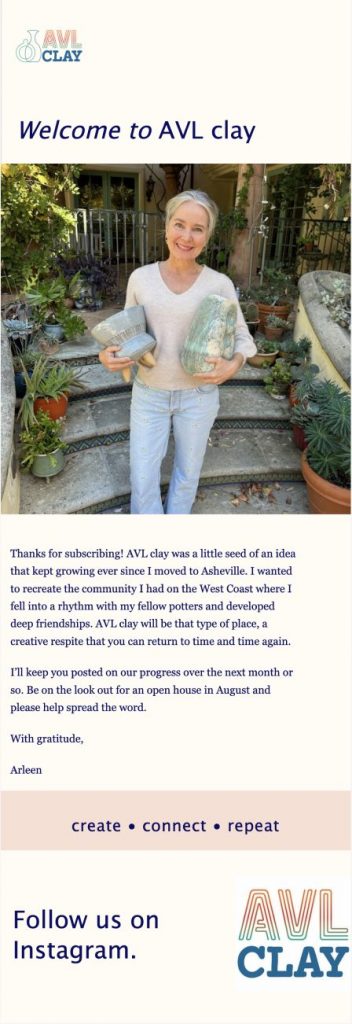
Arleen and Jon created a set of branded email templates in Nimble to make communication fast and consistent. They built welcome emails for new subscribers, monthly newsletters with studio highlights, and invitations to workshops and open houses.
- Keeps messaging polished and on-brand
- Saves time by reusing templates for different segments
5. Send Newsletters and Announcements
With everything in place, Arleen uses Nimble’s group messaging to send personalized updates to her audience. Whether she’s announcing a new workshop, sharing studio news, or inviting the community to an open house, emails reach the right people at the right time.
- Targets specific groups based on tags and workflows
- Maintains ongoing engagement with subscribers

From Launch to Leads: How Arleen Started Growing Her Studio Community in Under a Week
In less than a week of setting up Nimble with Squarespace, Arleen began seeing steady sign-ups from people eager to join her mailing list, attend workshops, and stay connected with the new pottery studio. By pairing Squarespace’s elegant website with Nimble’s powerful CRM tools, she and Jon built an affordable, streamlined system that delivers results fast:
- Quick Results – New leads and newsletter sign-ups started flowing in within days of launching the Nimble-powered forms.
- Affordable Growth – Nimble’s $29.90/month plan replaced Squarespace’s costly upgrades and avoided unpredictable email marketing fees.
- Increased Awareness – Consistent newsletters and announcements helped more people discover the new studio space.
- Stronger Engagement – Subscribers open, click, and respond to Arleen’s updates more frequently.
- Simplified Operations – Nimble centralizes lead capture, organization, workflows, and outreach into one easy-to-use platform.
Get Started with Nimble + Squarespace
Arleen’s success shows how simple it can be to capture leads, organize contacts, and grow your community when you combine Nimble CRM with your Squarespace website. Whether you’re running a studio, small business, or creative space, you can set up the same process to start attracting and nurturing leads right away.
Want to learn exactly how to implement this strategy step by step?
➡ Take a look at our blog post for a full guide on setting up Nimble with Squarespace and start building your growth system today.